Manual
Drum Peter 0.2 BETA for the M-VAVE FM-1. Built on FM1 Open V14.
1. First start
After installing, the FM-1 shows the Drum Peter start screen for about a second and then opens the DRUM page. Any key or knob skips the start screen.
If the project in memory is empty (no notes on any track), Drum Peter loads song 1, HYPNO 132, and shows SONG 1 LOADED. Press PLAY to hear it. A project that already has notes is never changed; the FM-1 always starts with the project you saved last.
Nothing is written to memory until you save with SAVE. Until then the SAVE light blinks once a second.
2. The panel
| Control | On the DRUM page | Elsewhere |
|---|---|---|
| SELECT | Track 1–4 (808, 909, 606, 707) | Track, or the page's own list |
| ALGORITHM | Track length 16 / 32 / 48 / 64 | Sub-page on the step editor |
| PRESETS | Kit or program of the track | Step cursor, project slot |
| K1 | Drum | Page parameters |
| K2 | Velocity of the edited step | Page parameters |
| K3 | Chance of the edited step | Page parameters |
| K4 | Tune of the drum | Page parameters |
| White keys | The 16 steps of the selected drum | Notes, mute/solo, slots |
| Black keys | Pick and play a drum | Drums, editor shortcuts |
| OCT − OCT + | Previous / next 16 steps | Octave of the keyboard |
| SEQ | Opens the full step editor | Back to DRUM |
| HOME | Project and preset browser | Back to DRUM |
| EDIT | Sound editor of the selected drum (hold: every parameter) | Sound editor |
| ENV LFO SCL | Envelope, LFO and advanced sound pages | |
| FX | Reverb and delay sends, effect settings, tempo and delay sync | |
| GLO | Tap: mixer. Hold: mixer while held | |
| ARP | Tap: roll / arpeggiator on or off. Hold: its settings | |
| SAVE | Project menu: save, load saved, load template, new | |
| PLAY REC | Start / stop, record | |
3. The DRUM page
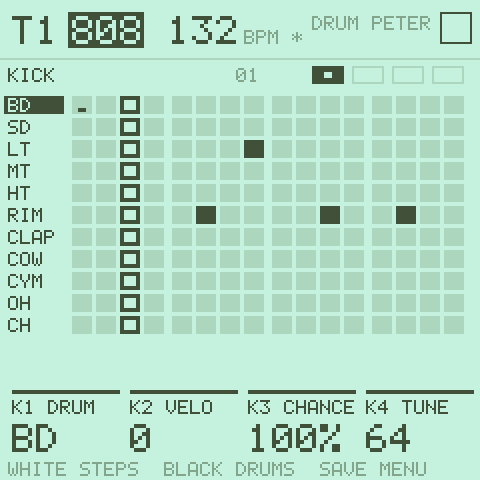
- Header: track number, the kit of the track (808, 909, 606, 707; grey when the track is muted), tempo, a
*when there are unsaved edits, and a square that fills on every beat. - Title line: the full name of the selected drum, the number of the edited step, and four boxes for the four 16-step pages. The filled box is the page you see, the dot shows the page that is playing, outlined boxes are past the track's length.
- Grid: one row per drum, eleven rows. Dark cells play. The selected drum's label is inverted; any label flashes when its drum plays. The small bar marks the step you edited last.
- Knobs: the four values K1–K4 control. The bottom line shows hints and messages.
4. Writing steps
Pick a drum
Press a black key. The first black key is the kick (BD), then snare, low, mid and high tom, rim, clap, cowbell, cymbal, open hat and closed hat. You hear the drum and it becomes the selected row. K1 does the same without playing it.
Set and clear steps
Press a white key: key 1 is step 1 of the page, key 16 is step 16. Press it again to clear the step. The key lights up while the step is set, so the keyboard always shows the selected drum's pattern.
Velocity and accent
The step you pressed last is the edited step (its key blinks twice a second while stopped). K2 sets its velocity, 0–127. From 120 up it counts as an accent. Velocity belongs to the whole step, so all drums on that step share it.
Chance
K3 sets how often the edited step plays: 100% always, down to 12% in eighths. Turn right for more often.
Tune
K4 tunes the selected drum. For every other drum setting (decay, tone, snappy, drive, pan…) tap EDIT; see Sound editing.
5. Kits
Drum Peter has four drum tracks, one kit each. SELECT moves between them; the header shows the kit.
| Track | Kit | Character |
|---|---|---|
| T1 | 808 | Deep kick, the classic engine settings |
| T2 | 909 | Short punchy kick, bright snappy snare, crisp hats |
| T3 | 606 | Small, high and dry |
| T4 | 707 | Round, punchy and clean |
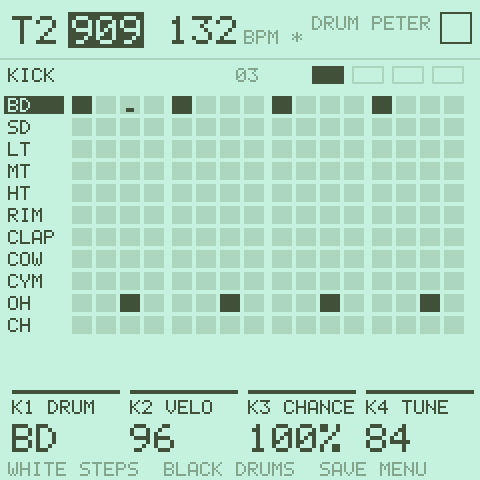
All four kits use the FM1 Open DRUM 808 engine; the 909, 606 and 707 are settings of it. Change any drum with EDIT: your changes are saved with the project. Tracks 5–8 are switched off in Drum Peter.
6. Songs
Eight songs are built into the firmware as templates. Load them from the project menu: SAVE, key 3 (LOAD TEMPLATE).
| # | Song | BPM | Style |
|---|---|---|---|
| 1 | HYPNO 132 | 132 | Hypnotic techno |
| 2 | HARD 145 | 145 | Hard techno with an 808 rumble |
| 3 | ELECTRO 126 | 126 | Electro on the 808 |
| 4 | HOUSE 124 | 124 | House with swing |
| 5 | MINIMAL 128 | 128 | Minimal |
| 6 | BREAKS 136 | 136 | Breakbeat |
| 7 | DUB 118 | 118 | Dub techno |
| 8 | BOOM BAP 90 | 90 | Hip hop with swing |
A song replaces the current project. Save it to one of your 16 slots to keep your changes.
7. Length and pages
Turn ALGORITHM to set the track's length to 16, 32, 48 or 64 steps. While playing, a new length starts at the track's next loop. Each track has its own length, so a 48-step hat line can run against a 64-step kick.
OCT − and OCT + show the previous or next 16 steps; their lights show which way there are more. While playing, the page follows the playhead until you change page; going back to the playing page follows it again.
8. Play, record and tempo
- PLAY starts and stops. HOME + PLAY stops everything and silences all notes.
- REC: while stopped, step recording (play notes, releasing all keys moves to the next step); while playing, live recording. REC again ends it. During recording the keys play notes instead of setting steps.
- Tempo: hold HOME and tap SEQ in time. Or set it with K4 on the step editor's first page, or on the FX tempo page. 30–300 BPM.
- Swing, click and count-in: step editor (SEQ), turn ALGORITHM to page 3/8 RHYTHM/REC.
- MIDI clock: step editor page 5/8 SYNC / LOOP.
9. Roll
The arpeggiator is a drum repeat. Tap ARP to switch it on (ARP ON), then hold a black key: the drum rolls at the set rate. Hold ARP for its page: RATE and DIRECTION, then (turn ALGORITHM) SWING and HOLD. While roll is on the ARP light blinks every sixteenth.
10. Mixer
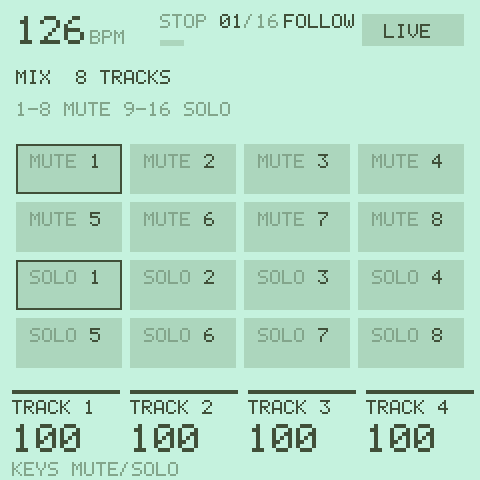
Tap GLO to open it, tap again to go back. Or hold GLO to use it only while held.
- White keys 1–8 mute tracks 1–8; keys 9–16 solo them.
- K1–K4 set the volume of the four kits.
- Lights: a playing track's key is lit, a muted track's key double flashes, a solo key blinks fast. Outside the mixer, GLO double flashes every bar while anything is muted or soloed.
11. Sound editing
Tap EDIT for the sound editor. It opens on the selected drum; K1–K4 change its first four parameters, and pressing a drum's key switches to that drum. Press SCL or hold EDIT for the advanced editor with every parameter; there SELECT turns the pages of four. ENV and LFO open the envelope and LFO pages. FX holds the reverb and delay sends of the track and the effect settings. Every sound edit can be undone with HOME + SAVE.
12. Project menu: save, load, new
Press SAVE on any page. A menu opens; pick an entry with keys 1–4 (or SELECT and SAVE). HOME goes back.
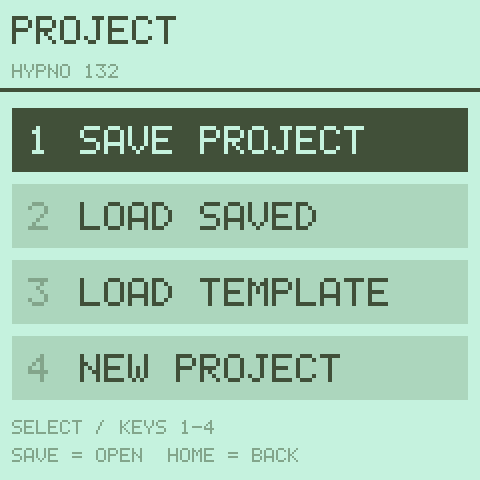
1 · Save project
Pick a slot 1–16 with SELECT or PRESETS. K1 moves the cursor in the name, K2 changes the letter. SAVE writes it; on a used slot it asks OVERWRITE? and a second SAVE confirms.
2 · Load saved
Your 16 slots as a list of names, eight at a time; it opens on the slot you used last. Press a white key to load that slot, or move with SELECT / PRESETS and press PLAY to load and start. The small square marks the project that is loaded now.
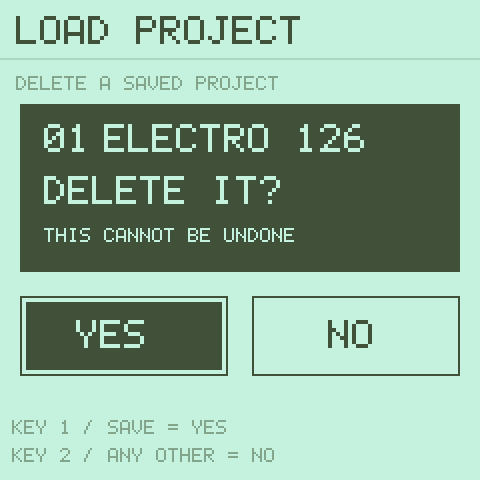
Delete a save: move to it and press EDIT. It asks DELETE IT? Key 1 or SAVE = YES, key 2 or any other button = NO. A deleted save cannot be brought back, and undo does not cover it.
3 · Load template
The eight built-in songs. A template replaces the current project; save it to keep your changes.
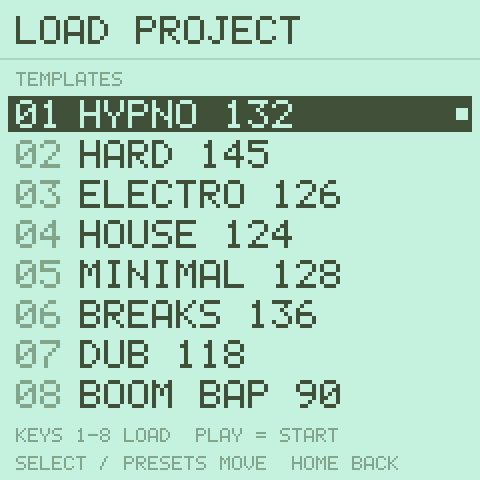
HOME on the DRUM page opens the same list too; there K1 switches between your saves and the templates.
4 · New project
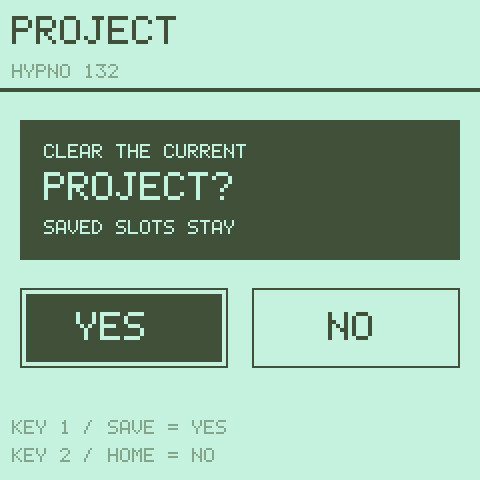
Asks CLEAR THE CURRENT PROJECT? Key 1 or SAVE = YES, key 2 or HOME = NO. YES gives an empty project: the four kits with no steps, tempo 130, ARP off, nothing muted, tracks 5–8 off. Your saved slots are not touched, and HOME + SAVE undoes it.
- HOME + SAVE: undo / redo the last edit.
- Copy, paste, clear and repeat: SEQ + EDIT opens the actions menu.
13. Shortcuts
| Hold | Press or turn | Does |
|---|---|---|
| - | SAVE | Project menu: save, load saved, load template, new |
| Load saved list | EDIT | Delete the save (asks YES / NO) |
| HOME | SEQ in time | Tap tempo |
| HOME | SAVE | Undo / redo |
| HOME | PLAY | Stop everything |
| SEQ | EDIT | Actions: copy, paste, clear, repeat |
| GLO | keys, knobs | Mixer while held |
| ARP (hold) | - | Roll / arpeggiator settings |
14. Blink codes
The panel lights are on or off; there is no dimming. So each state has a rhythm.
| Light | Rhythm | Means |
|---|---|---|
| White key | Steady | The selected drum plays on this step |
| White key | Running light | Playhead: an empty step lights for half a sixteenth, a set step blinks off for a moment |
| White key | 2 Hz, while stopped | The edited step |
| Black key | Steady | The selected drum (goes off for a moment when it plays) |
| Black key | Short flash | That drum just played |
| PLAY | First third of every beat, two thirds on beat 1 | Playing; shows the bar. Slow blink: paused |
| REC | 8 Hz | Recording |
| SAVE | 1 Hz | Unsaved edits |
| GLO | Double flash each bar (every 2 s when stopped) | Something is muted or soloed |
| ARP | Every sixteenth (steady when stopped) | Roll / arpeggiator on |
| White keys 1–4 | On, the chosen one blinks | Entries of the project menu; keys 1–2 are YES / NO when it asks |
| OCT − / + | Steady | More steps that way |
| SEQ FX ENV LFO HOME | Steady | That page is open |
15. Troubleshooting
The keys play notes instead of setting steps
You are recording (REC blinks), the mixer is open, or you are not on the DRUM page. Press REC to stop recording, or HOME to go back to DRUM.
A sound keeps playing that I cannot find
Old projects can hold a track with ARP HOLD or the PLAY role. HOME + PLAY silences everything; SAVE › NEW PROJECT › YES clears it for good (ARP off, tracks 5–8 off).
Song 1 did not load at start
It only loads on an empty project; the FM-1 starts with the project you saved last. Load it from SAVE › LOAD TEMPLATE.
Hanging notes
HOME + PLAY stops and silences everything.
Back to the original firmware
Open the installer and choose Restore original V15. Export your projects and samples first: Drum Peter projects do not open on stock firmware.