HYPNOTIC TECHNO FIRMWARE · M-VAVE FM-1
HYPNOTIC
MIKE
Your FM-1, dressed as the phone everyone* had. Eight layers of a hypnotic techno track, patterns that mutate while they loop, live effects, two shades of green and a symbol for every layer. Tested and working on the M-VAVE FM-1 (FCC ID: 2ARCP-FM1).

Eight layers, eight symbols
The eight tracks are the eight layers of a hypnotic techno track, top to bottom in the order a live set brings them in. Every layer has its own phone symbol at the start of its ARRANGE row. It flips to inverse on every hit, so you see the groove move.
- 1 ATMOSNote · holds the drone
- 2 KICKBell · rings on every hit
- 3 RUMBLEBattery · fills with low end
- 4 HATSKeypad · ticks like key presses
- 5 PERCHandset · sends out sound waves
- 6 TOPSSignal · shimmers at full bars
- 7 SEQSnake · loops round and round
- 8 CLAPMessage · pings on 2 and 4
Five modes on one slider
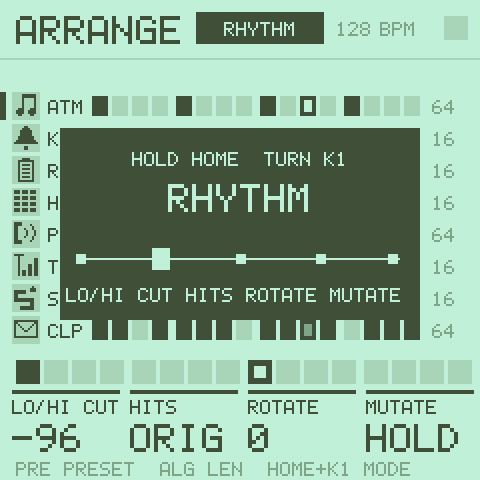
Hold HOME on ARRANGE and turn K1: a slider picks what K1 to K4 do. LIVE puts the master effects and the tempo under your fingers. In RHYTHM, GROOVE and SPACE, K1 is the LO/HI CUT filter. In USER you build your own map: hold EDIT, turn a knob, release to save. SELECT picks the layer, PRESETS its preset, ALGORITHM the length.
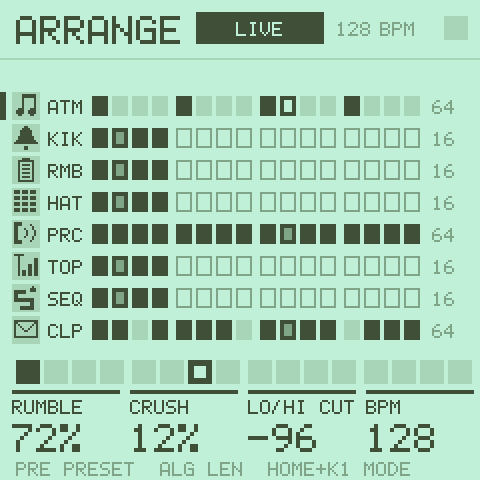
- LIVEK1 RUMBLE
K2 CRUSH
K3 LO/HI CUT
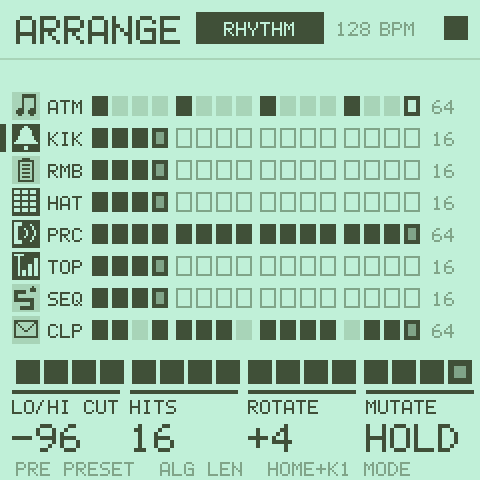
K4 BPM - RHYTHMK1 LO/HI CUT
K2 HITS
K3 ROTATE
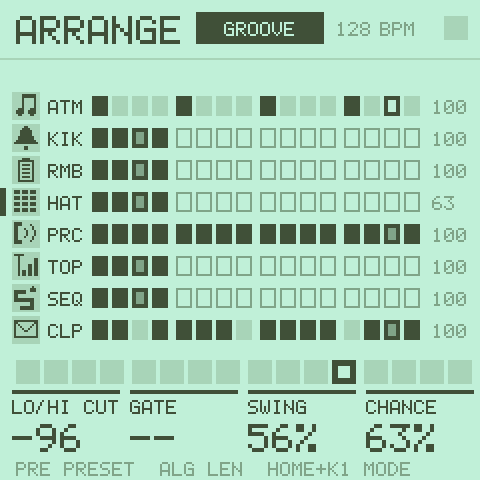
K4 MUTATE - GROOVEK1 LO/HI CUT
K2 GATE
K3 SWING
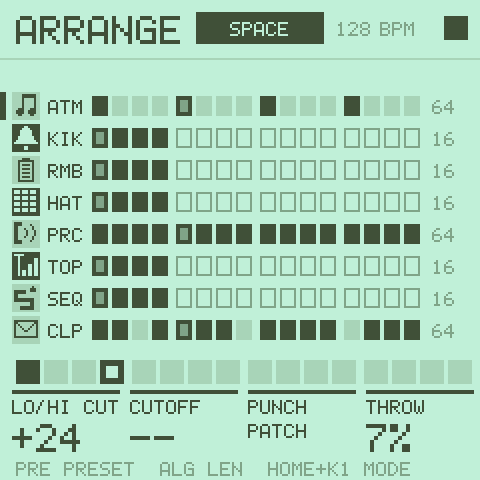
K4 CHANCE - SPACEK1 LO/HI CUT
K2 CUTOFF
K3 PUNCH
K4 THROW - USERK1 your pick
K2 your pick
K3 your pick
K4 your pick
Menu
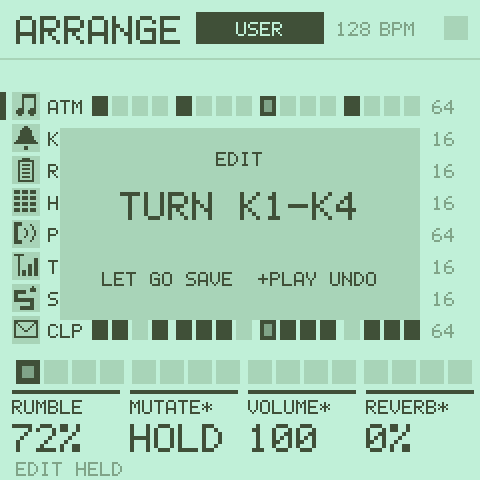
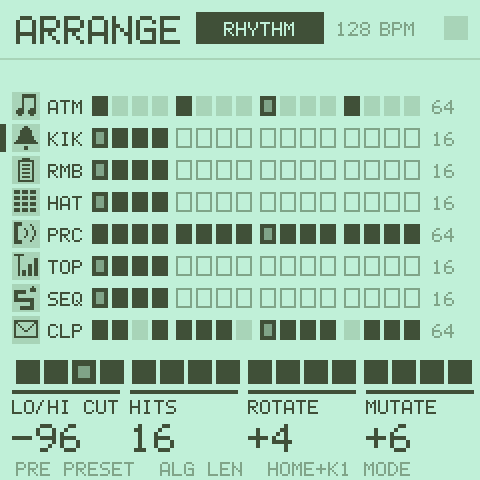
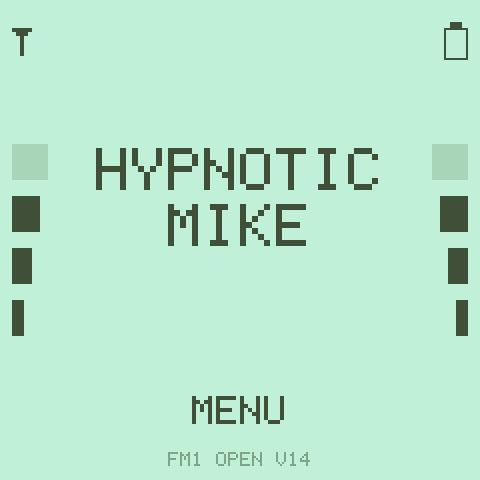
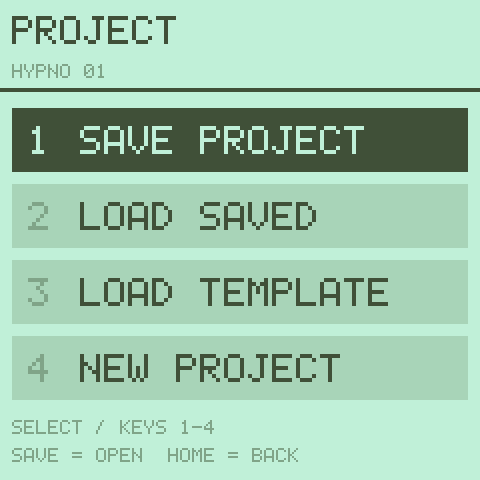
Screens from the real firmware, rendered by its own drawing code.
Manual
Everything you need to play HYPNOTIC MIKE, in the order you will need it.
1 · The ARRANGE screen
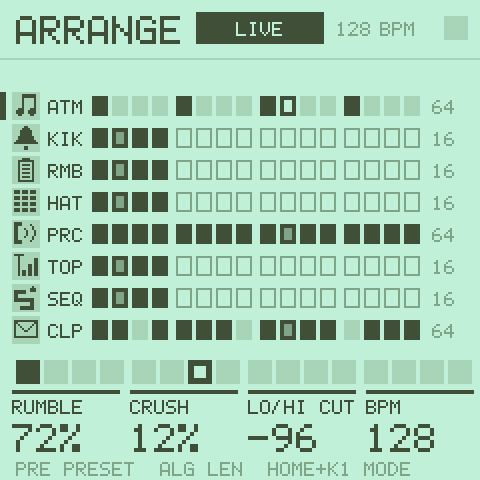
- Header. Mode name (inverted box), tempo in BPM, and a square that lights up whenever any track is loud.
- Layer symbol. One per layer. It flips to inverse on every hit, so you can see which layers are firing.
- Layer tag.
ATM,KIK,RMB,HAT,PRC,TOP,SEQ,CLP. The selected layer has a bar on the left edge. - Bars. 16 cells = 16 bars of 4 steps, grouped in 4 sections. Filled: the bar has notes. Light: empty bar. Outlined: the bar playing now. Thin frame: beyond the track's length.
- Right column. Track length in steps. In GROOVE mode it shows the track's CHANCE instead.
- Zoom strip. The 16 steps of the section the selected track is playing, one cell per step. The playhead is outlined.
- Knob row. K1 to K4: the four parameters of the mode, names and values.
- Hint line. Short reminders and warnings, for example
NOT ON DX7.
2 · Knobs on ARRANGE
| Knob | Does | Notes |
|---|---|---|
| SELECT | Choose layer 1–8 | Everything below acts on this layer, except SWING, BPM and the live effects. |
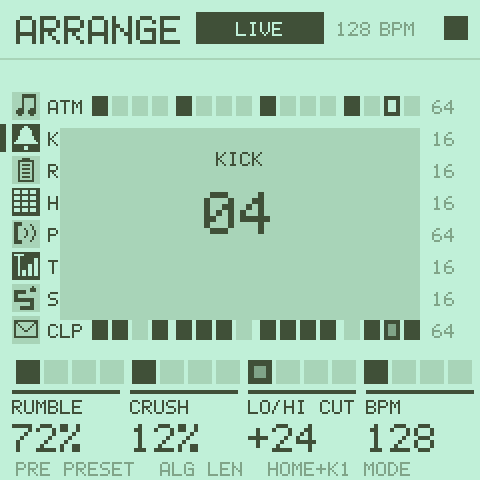
| PRESETS | Next / previous preset of the layer: sound and pattern | The layer name and preset number pop up. HOME + SAVE undoes it. See chapter 4. |
| ALGORITHM | Track length: 16 / 32 / 48 / 64 steps | The change lands when the track's loop comes round. |
| HOME (hold) + K1 | Mode: LIVE → RHYTHM → GROOVE → SPACE → USER | A slider shows the mode while HOME is held. |
| K1 · K2 · K3 · K4 | The four parameters of the mode | See chapter 5 and the table in chapter 8. |
3 · Buttons
| Press | Result |
|---|---|
| SEQ | Switch between ARRANGE and the step editor (write notes step by step). |
| HOME | Back to ARRANGE from any page. On ARRANGE, hold it and turn K1 for the mode slider. |
| PLAY | Start / stop. |
| REC | Recording on / off. |
| EDIT (tap) | Quick sound editor of the selected track. Tap again to return. |
| SCL | Deep sound editor (DX7 operators, or the engine's full page). |
| ENV · LFO | Envelope page · LFO page of the selected track. |
| FX | Effects of the track. Turn PRESETS for the shared FX and the delay page. |
| GLO (tap) | Mixer. Keys 1–8 mute, keys 9–16 solo. |
| GLO (hold) | K1–K4 set the volume of tracks 1–4 (or 5–8, if a track from 5–8 is selected); keys mute / solo. Release to go back. |
| ARP (tap · hold) | Arpeggiator on / off for the track · arpeggiator settings. |
| OCT− · OCT+ | Keyboard octave, −2 to +2. |
| SAVE | Project menu: 1 SAVE PROJECT, 2 LOAD SAVED (your 16 slots), 3 LOAD TEMPLATE (the 16 factory sets), 4 NEW PROJECT (asks YES / NO). SELECT, K1 or PRESETS move, keys 1–4 pick, SAVE opens, HOME goes back. |
Shortcuts
| HOME (hold) + K1 | Mode slider on ARRANGE. Let go of HOME to stay in the chosen mode. |
| HOME + PLAY | Panic: all notes off, back to ARRANGE. |
| HOME + SAVE | Undo / redo the last edit. |
| HOME + SEQ (tap) | Tap tempo. Two taps start it; up to four are averaged. |
| HOME + PRESETS EDIT + PRESETS | Change the track's engine. Turn to choose, SAVE to apply, HOME to cancel. A new engine starts from its default sound. |
| SEQ + EDIT | Actions: copy, paste, clear, repeat to 32/48/64, undo, copy / paste timbre. |
| EDIT + REC | Rename the DX7 patch. |
4 · Layers and presets
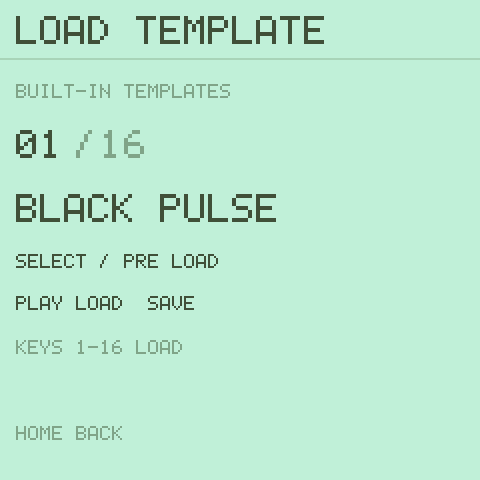
Each track is one layer of a hypnotic techno track. Turning PRESETS loads the next preset of that layer: its sound and its pattern, made for the job, all in A minor so any mix of presets fits together. Sixteen factory sets (SAVE → 3 LOAD TEMPLATE) load all eight layers at once.
The sixteen factory sets
Made to unsettle: dark kicks and drive, metallic bells and gongs, and in every set the ATMOS drone and the SEQ line are pulled against the A minor floor, a half step up (the Phrygian dread), a tritone away or a sour step down. Tempos run from 126 to 140 BPM.
01 BLACK PULSE · 02 STATIC NERVE · 03 HOLLOW CELL · 04 DREAD PULSE · 05 RUST ALARM · 06 GHOST STATIC · 07 VOID NERVE · 08 HUSH ALARM · 09 BLACK CELL · 10 HOLLOW DREAD · 11 RUST GHOST · 12 CELL ALARM · 13 STATIC HUSH · 14 GHOST PULSE · 15 DREAD VOID · 16 HOLLOW RUST
| Layer | Engine | Presets | What it plays |
|---|---|---|---|
| 1 ATMOS | DX7 | 16 | A drone held over the bar: pads, strings, voices, gongs. Some move in bar 3 or 4. |
| 2 KICK | 808 | 16 | Four on the floor. Tone, decay, tune, drive and distortion change; some add a ghost kick in bars 3–4. |
| 3 RUMBLE | 303 | 14 | Low sub notes rolling between the kicks. |
| 4 HATS | 808 | 16 | Off-beat open and closed hats, sixteenths, one 3-step polymeter. |
| 5 PERC | Pluck | 16 | Short wood and metal notes in 3, 5, 6, 7, 9, 11 or 13-step cycles that drift against the bar. |
| 6 TOPS | 808 | 14 | Ride, shaker, cowbell and conga figures. |
| 7 SEQ | DX7 | 16 | Hypnotic stabs and bells: 16-step loops or odd cycles. |
| 8 CLAP | 808 | 12 | Clap or snare on 2 and 4, rim polymeters, delayed and big-room claps. |
Playing live
- Load a factory set (SAVE → 3 LOAD TEMPLATE, choose, PLAY). Open the mixer (GLO tap) and mute everything but ATMOS.
- Bring the layers in from top to bottom, one every 8 or 16 bars: ATMOS, KICK, RUMBLE, HATS, PERC, TOPS, SEQ, CLAP.
- Change presets on layers that are muted, then unmute them: the change lands silently.
- For a breakdown, mute down to KICK alone (or pull LO/HI CUT left), then bring the layers back one by one.
A preset replaces that track's sound and pattern; HOME + SAVE undoes it. If the FM-1 has no memory left for the new sound, NO MEMORY FOR SOUND appears and the track keeps its old one.
Lights
While ARRANGE plays, the keyboard turns into SNAKE: a snake crawls one key per sixteenth, bounces at the ends and hunts a blinking dot. Every dot eaten makes it longer; at ten keys the board flashes and it starts small again. Every kick inverts the whole keyboard, every clap throws the dot somewhere new, each layer flashes its own panel button on its hits and the other buttons run a ring that turns round every bar.
5 · The five modes
LIVE · master effects and tempo
- K1 RUMBLE adds the classic techno rumble: the low end of the whole mix (mostly the kick) smeared into a rolling tail that ducks under each kick. OFF … 100 %.
- K2 CRUSH bit and sample-rate crusher on the whole mix. OFF … 100 %.
- K3 LO/HI CUT one knob filter. Left of 0 (−1 … −100) a low cut that takes the bass away, up to 1.6 kHz; right of 0 (+1 … +100) a high cut that closes down to 200 Hz. 0 is OFF. K1 of RHYTHM, GROOVE and SPACE is the same filter.
- K4 BPM the tempo.
EXTwhen the FM-1 follows MIDI clock.
The live effects act on the whole mix, are not saved and start OFF after power-on.
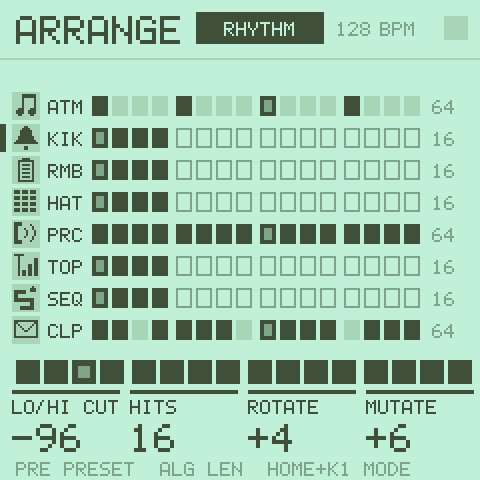
RHYTHM · pattern
- K2 HITS spreads N hits evenly over the track (Euclidean). Turn left to the end for ORIG: your own written notes, untouched.
- K3 ROTATE shifts the pattern around the loop. Same hits, new accent.
- K4 MUTATE rewrites the pattern each time the loop starts. Left (−1 … −8) erodes: hits drop out, freshly each loop. Right (+1 … +8) evolves: hits wander to empty steps and the changes add up. HOLD (centre) stops it and brings back the HITS / ROTATE pattern.
Melodic tracks keep their notes: HITS reuses the pitches you wrote. On drum tracks HITS acts on the drum part selected in the step editor.
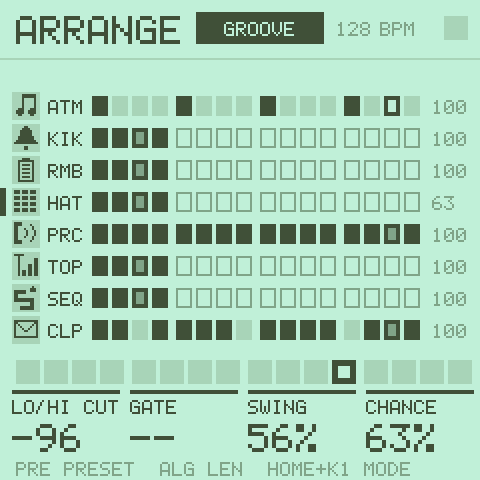
GROOVE · feel
- K2 GATE note length for every step of the track, 1/16 to full. Melodic tracks only.
- K3 SWING global swing of the sequencer: all tracks.
- K4 CHANCE probability that each step plays: 100 %, 88 % … 12 %. Great for hats and ghost notes.
SPACE · sound and depth
- K2 CUTOFF filter offset ±99. Not on DX7 tracks.
- K3 PUNCH decay of the amp envelope. DX7 tracks only; switches the envelope on if the patch had it off.
- K4 THROW dub throw: raises the delay send while you turn and drops back 1.5 s after you stop.
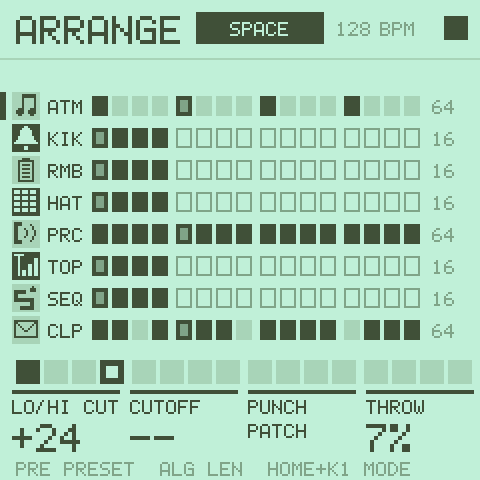
--, PUNCH works.6 · USER mode: your own knobs
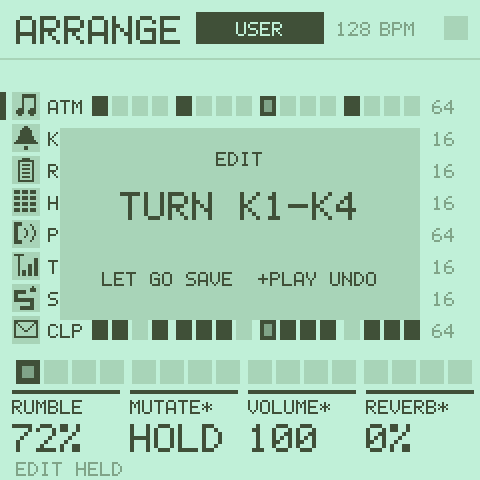
*.- Hold HOME and turn K1 to USER.
- Hold EDIT and turn K1, K2, K3 or K4. Each click steps to the next of the fifteen parameters; the knob label at the bottom shows the pick with a
*. - Let go of EDIT to keep the map (SAVED). Press PLAY while holding EDIT to throw the changes away.
- Picking a parameter another knob already has swaps the two knobs.
- Changing the map never changes the sound or the patterns.
- Parameter order: HITS, ROTATE, MUTATE, GATE, SWING, CHANCE, CUTOFF, PUNCH, THROW, REVERB, VOLUME, RUMBLE, CRUSH, LO/HI CUT, BPM. REVERB and VOLUME exist only in USER.
- The starting map is RUMBLE · HITS · REVERB · VOLUME. A good live map: LO/HI CUT · HITS · CHANCE · THROW.
7 · Recipes
Rumble drop
- LIVE: K3 LO/HI CUT left to −60 for 8 bars.
- K1 RUMBLE up to 60–80 %.
- Snap K3 back to OFF on the one.
Find the kick
- SELECT 2 KICK.
- Turn PRESETS while it plays.
- Stop on the one that fits the room.
Hats that breathe
- HITS → 8 or 16.
- GROOVE: CHANCE 62–75 %.
- Add a little SWING.
Slow hypnotic drift
- Write a melody in the step editor (SEQ).
- Back on ARRANGE: ALGORITHM → 64 steps.
- MUTATE → +2. Turn back to HOLD when you like it.
Breakdown
- RHYTHM, MUTATE → −6 on drums: they thin out.
- K1 LO/HI CUT right to +70: the top closes.
- MUTATE → HOLD and K1 → OFF to drop back in.
Dub throw
- SPACE on the perc track.
- Flick K4 THROW right on the last beat.
- It returns by itself after 1.5 s.
Phasing lengths
- Track A at 64, track B at 48.
- They line up again only every 192 steps.
- Keep the kick at 16 as the anchor.
Crushed tops
- LIVE: K2 CRUSH to 40 %.
- K3 LO/HI CUT to −40: only the crushed top end is left.
- Ride it for 8 bars, then both back to OFF.
8 · Parameter table
| Parameter | Mode | Display | Range | Works on |
|---|---|---|---|---|
| HITS | RHYTHM | ORIG or count | ORIG, 0 … length | all tracks |
| ROTATE | RHYTHM | +6 | 0 … length − 1 | all tracks |
| MUTATE | RHYTHM | HOLD, −3, +8 | −8 … +8 | all tracks |
| GATE | GROOVE | 50% | 6 … 100 % | melodic tracks |
| SWING | GROOVE | 50% | sequencer range | whole song |
| CHANCE | GROOVE | 75% | 12 … 100 % in eighths | all tracks |
| CUTOFF | SPACE | +12 | ±99 | not DX7 |
| PUNCH | SPACE | decay or PATCH | envelope range | DX7 only |
| THROW | SPACE | OFF or % | 0 … 100 % | all tracks |
| REVERB | USER | 40% | 0 … 100 % | all tracks |
| VOLUME | USER | level | engine range | all tracks |
| RUMBLE | LIVE | OFF or % | 0 … 100 % | whole mix |
| CRUSH | LIVE | OFF or % | 0 … 100 % | whole mix |
| LO/HI CUT | LIVE; K1 of RHYTHM, GROOVE, SPACE | OFF, −40, +60 | −100 low cut … +100 high cut | whole mix |
| BPM | LIVE | tempo or EXT | sequencer range | whole song |
9 · Saving
- SAVE → 1 SAVE PROJECT: choose a slot and save. 4 NEW PROJECT keeps the eight layer sounds and clears every note. The steps, chances, gates and sends that HYPNOTIC MIKE wrote are saved with the project.
- Saved: the sound and pattern a layer preset wrote, and the tempo.
- Not saved: the knob positions of HITS, ROTATE and MUTATE, the preset numbers, the live effects and the USER map. After power-off they start from ORIG / 0 / HOLD, OFF and the default map. Your saved pattern is whatever was playing when you pressed SAVE.
- Unsaved edits are lost at power-off. HOME + SAVE undoes the last edit.
10 · Limits
- Track lengths are 16, 32, 48 or 64 steps. The sequencer is M-VAVE's own and has no other lengths.
- No ratchets or nudge.
- The FM-1 is full: to fit ARRANGE, HYPNOTIC MIKE has no Bluetooth settings page (Bluetooth MIDI still works with its saved settings), uses short help texts and stores the original DX7 factory bank with a tighter, lossless encoding.
- MIDI: tracks 1–7 listen on channels 1–7, track 8 on channel 10.
Install on your FM-1
Everything runs in the browser over USB-MIDI: no drivers, no apps. The original V15 firmware is built into the installer, so you can always go back.
TESTED. HYPNOTIC MIKE passed its tests on the M-VAVE FM-1 (FCC ID: 2ARCP-FM1). As with any firmware update, back up first and keep the FM-1 powered and connected until the installer says it is done.
The installer opens in this tab. Use desktop Chrome or Edge and a USB data cable.
Ready check
- …Firmware built and included
- …Browser supports Web MIDI
- …Page opened over https or localhost
- …Desktop computer, not a phone
This build
- FILE
- HYPNOTIC-MIKE.fwsc
- SIZE
- –
- BUILT
- –
- SHA-256
- –
Back up
Export the projects, voices and samples you want to keep. Close DAWs and other MIDI apps.
Connect
Switch the FM-1 on, plug in the USB cable, press START INSTALLER, then Connect device. Allow MIDI / SysEx.
First time from stock V15
The installer sees
FM-1_015. Click Enable force flash and reconnect. Nothing is written yet. Coming from FM1 Open? Skip this step.Install
Tick the backup box, click Force flash (or Install) and confirm. Do not unplug while it writes. The FM-1 restarts into the HYPNOTIC MIKE boot screen.
About
HYPNOTIC MIKE is made by BULØKE, a graphic designer with 15 years in the field and a beginner techno producer, learning from professional producers and educators. Code written together with Claude. Built on M-VAVE's FM1 Open.